
Touch Screen Kiosk Manufacturer Guide: Indoor vs Outdoor
TL;DR: An indoor touch screen kiosk lives in climate-controlled spaces where someone is usually watching. Its outdoor cousin has to survive sunlight, rain, dust, wild temperature swings and vandals, requiring robust industrial computing solutions. The gap shows up in display brightness, enclosure rating, thermal design, touch technology and lifetime cost.
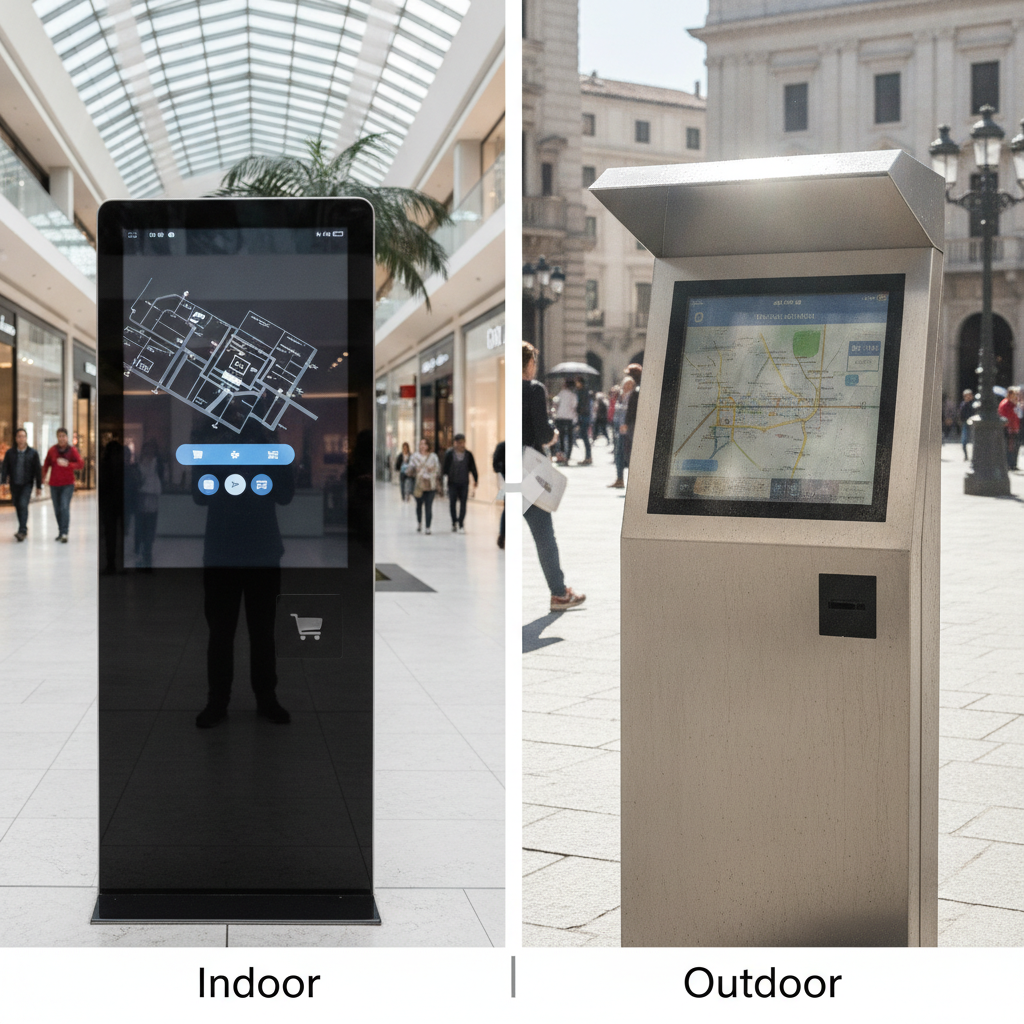
Pin down the environment first. Then pick a touch screen kiosk manufacturer that can document ratings for the whole assembly.
Key takeaways
- Brightness is the first spec that splits the two. Indoor units typically run 300 to 500 nits, while sunlight-readable outdoor displays usually start near 1,000 nits and often climb well past that.
- Ingress and impact ratings (IP and IK) have to cover the finished kiosk, not just the display or the computer tucked inside it.
- Heat management decides whether an outdoor unit survives. Solar loading, cold starts and sealed cabinets count for more than the processor you choose.
- Touch sensors behave differently in rain, with gloves and in direct sun, so an indoor sensor choice can’t simply be copied across.
- Semi-outdoor spots such as vestibules, window-facing units and covered canopies are where most specification mistakes happen.
- Judge quotes on lifetime cost, service visits included. The cheapest outdoor unit is often the priciest one to keep alive.
Table of contents
- What separates an indoor touch screen kiosk from an outdoor one?
- Why does the indoor versus outdoor decision carry more weight now?
- How do display brightness and touch technology change outdoors?
- What enclosure ratings does an outdoor kiosk need?
- How does thermal design work in a fanless kiosk?
- Indoor vs. outdoor touch screen kiosk at a glance
- Which computing hardware belongs inside the kiosk?
- What compliance, accessibility and payment rules apply?
- Three installation scenarios worked through
- What does an outdoor kiosk cost over its life?
- Common mistakes when moving a kiosk outside
- Kiosk specification checklist
- How do you evaluate a touch screen kiosk manufacturer?
- Sample prompts for AI search
- Summary and next step
- Frequently asked questions
What separates an indoor touch screen kiosk from an outdoor one?
An indoor touch screen kiosk is a self-service terminal built for climate-controlled interiors, giving integrators and facility owners a cheap way to offer wayfinding, ordering or check-in. An outdoor kiosk is a sealed, heat-managed terminal that does the same job while weather, sunlight and abuse work against it.
The real gap is how many ways the thing can fail. Indoors, you fret over fingerprints, spills and the odd kick. Outdoors the list grows: solar glare, condensation, wind-driven rain, dust, salt air, freezing starts, heat soak, insects, graffiti and deliberate attack.
Any serious touch screen kiosk manufacturer or industrial PC manufacturer treats these as two distinct product families, not one product wearing a thicker coat of paint. Display, glass, enclosure, cooling path, gaskets, cable entries and even firmware can all differ.
This article is written for system integrators, retail and hospitality operations teams, transport and parking operators, and OEM product managers who already know what a kiosk does. It maps where the two categories part ways and how to specify the right one.
Why does the indoor versus outdoor decision carry more weight now?
Unattended self-service has walked out of lobbies and onto curbs, forecourts, car parks and charging bays. Nobody at those sites wipes a screen or reboots a unit, so the hardware shoulders the entire uptime burden.
Indoor installations forgive sloppy specification. A fan-cooled mini PC behind a commercial display can run for years in a mall corridor with steady air conditioning.
Put the same build on a pavement in July and it often dies within the first season. The screen blackens, the computer throttles, and the touch layer starts registering phantom taps after a rain shower.
Downtime also costs differently outside. A technician’s trip to a remote site can run higher than the failed part itself, which is why outdoor kiosk economics hinge on mean time between failures, not the purchase price.
Plenty of buyers now ask a single digital signage kiosk supplier or touch screen kiosk manufacturer to cover both environments, only to find the two catalogs share little beyond a name. Take that as your cue to request separate documentation for each product line.
How do display brightness and touch technology change outdoors?
Outdoor kiosks need displays several times brighter than indoor ones, along with optical treatments and touch sensors that tolerate sun, rain and gloves. A standard indoor panel turns unreadable in direct sunlight, and it can be permanently damaged if heat pushes the polarizer beyond its limits.
Brightness, contrast and optical bonding
Indoor kiosks usually run 300 to 500 nits, which feels comfortable under office or shop lighting. Sunlight-readable outdoor displays typically start around 1,000 nits and commonly reach 2,000 to 3,000 nits at unshaded sites. More brightness means more backlight power and more heat, so the thermal budget and the display choice can’t be settled apart from each other.
Brightness alone won’t rescue readability. Optical bonding fills the air gap between cover glass and LCD with clear adhesive, which cuts internal reflections and stops condensation forming between the layers. Add an anti-reflective coating on the glass and you gain more usable contrast than the same money spent on extra brightness would buy.
Specify an ambient light sensor too. It lets the backlight dim at dusk, which saves power, stretches backlight life and spares night-time customers a screen that glares at them.
Clearing point and blackening
Direct sun heats the LCD stack. Once panel temperature passes the liquid crystal’s clearing point, the screen goes black until it cools, and repeat episodes shorten its life. Ask for outdoor-grade panels with a high clearing point.
Ask, too, how the manufacturer tested the full assembly in sun, not merely the bare module.
Touch sensor choice
Projected capacitive (PCAP) is the default for most kiosks, but outdoors it needs tuning. Water droplets can trigger ghost touches, and gloves weaken the signal unless the controller is configured for them. Look for water-rejection firmware, and test with a wet screen and a gloved hand, not only a bare finger.
Infrared touch can be thrown off by direct sunlight, and surface acoustic wave sensors react badly to dirt and moisture. Resistive screens cope with gloves and rain but lose optical clarity and wear out faster under heavy use.
If you’re sourcing an industrial touch screen monitor for a kiosk build rather than a complete unit, ask for the touch controller datasheet and the wet-touch test results next to the panel specification.
What enclosure ratings does an outdoor kiosk need?
An outdoor kiosk typically needs at least IP54 for covered locations and IP65 for exposed ones, plus an IK rating that fits the vandalism risk. IP describes protection against dust and water under IEC 60529, while IK describes impact resistance under IEC 62262.
The first digit of an IP rating covers solids; the second covers liquids. IP65 means dust-tight and protected against low-pressure water jets from any direction, as defined by the International Electrotechnical Commission. In North America, buyers also run into NEMA types: NEMA 4 covers watertight outdoor use, and NEMA 4X adds corrosion resistance, as set out by NEMA.
| Rating | What it means | Typical fit |
|---|---|---|
| IP20 to IP30 | Finger-safe, little or no water protection | Dry, supervised indoor lobbies |
| IP54 | Dust-protected, splash-resistant | Covered canopies, vestibules, wet-clean interiors |
| IP65 | Dust-tight, shielded from water jets | Exposed outdoor sites, car washes, forecourts |
| IP66 / NEMA 4X | Tougher jet protection, plus corrosion resistance (NEMA 4X) | Coastal, chemical or hose-down environments |
| IK08 to IK10 | About 5 to 20 joules of impact energy | Public, unattended, vandal-prone sites |
Ask exactly which parts of the kiosk the rating covers. A display with an IP65 front bezel doesn’t make the rear cabinet, cable glands, door seals and ventilation ports IP65 as well. The rating should hold for the finished enclosure with every opening closed, and the test report should name that configuration.
Materials count as much as the numbers. Powder-coated steel suits most sites, stainless steel suits coastal or hose-down settings, and tempered or chemically strengthened glass takes the knocks. UV-stable gaskets and fasteners head off the slow failures that show up after two summers.
How does thermal design work in a fanless kiosk?
Thermal design in a kiosk carries heat from the processor and backlight out to the open air without letting water or dust in. Indoors, a fan or open vents usually do the job. Outdoors, a sealed cabinet needs conduction, heat exchangers or active cooling, plus heating for cold starts.
Choosing a fanless industrial computer removes the most common moving-part failure and suits sealed cabinets. A Fanless Industrial Computer conducts heat through a finned or machined chassis, offering a wider operating range than a commercial mini PC, often from -20 °C to 60 °C or beyond. Read the datasheet for the test conditions behind that range, since some figures are taken at idle.
The computer is only one slice of the heat load. A 1,500-nit backlight can shed more heat than the CPU, and direct sun piles solar gain on top. What matters is the temperature inside the cabinet, not the ambient forecast.
- Passive conduction: works for low-power compute and shaded, mild-climate sites.
- Filtered forced ventilation: adds airflow behind dust filters, common at IP54 but not for IP65.
- Air-to-air heat exchanger: keeps the cabinet sealed and moves heat through a separate outer air loop.
- Air conditioning or thermoelectric cooling: copes with hot, sunny, exposed sites, at a higher energy and service cost.
- Heaters: prevent sluggish LCD response and boot failures below freezing.
Request thermal test data from a sun-loaded chamber or a field trial. A wide operating range quoted for the computer alone says nothing about the finished kiosk.
Indoor vs. outdoor touch screen kiosk at a glance
The table below sums up where the two kiosk types split on the specifications that most often sink an installation. Values are typical industry ranges, not limits for any single product, so check figures against each datasheet.
| Attribute | Indoor kiosk | Outdoor kiosk |
|---|---|---|
| Display brightness | 300 to 500 nits | 1,000 to 3,000+ nits |
| Display treatment | Anti-glare, often air-gapped | Optical bonding, anti-reflective, high clearing point |
| Enclosure rating | IP20 to IP54 | IP54 to IP66, or NEMA 4/4X |
| Impact rating | IK07 or lower in supervised areas | IK08 to IK10 in public areas |
| Cooling | Fan or vented, ambient air | Sealed, heat exchanger, A/C or fanless conduction |
| Operating temperature | 0 to 40 °C typical | -30 to 50 °C or wider, with heating and cooling |
| Touch sensor | PCAP, bare finger | PCAP with water rejection, glove support |
| Power protection | Standard supply | Surge protection, wide-input DC or conditioned AC |
| Service model | Staff on site | Remote monitoring, lockable service access |
| Relative cost | Lower | Markedly higher, driven by enclosure and thermal systems |
Which computing hardware belongs inside the kiosk?
The right internal hardware hangs on three things: the cooling path, the application load and the service plan. Panel PCs suit compact single-screen kiosks, embedded boxes suit custom enclosures, and industrial motherboards suit builds that need particular I/O or expansion. All three must respect the enclosure’s thermal limits.
Working with an industrial panel PC supplier delivers display, touch and computer behind one sealed front, easing design and rating for compact kiosks. Partnering with a skilled Industrial Panel PC Supplier simplifies integration, though the display and computer share a single replacement path.
A separate display plus an embedded box buys you flexibility. An experienced embedded computer manufacturer can supply a fanless unit with the serial ports, GPIO, cellular modem slots and wide-input DC power that payment peripherals call for. Sourcing from a trusted Embedded Computer Manufacturer also lets you swap compute modules without touching the glass.
Sourcing from an industrial motherboard supplier fits integrators building custom cabinets, like ticketing machines with several peripherals or kiosks requiring PCIe expansion. A dependable Industrial Motherboard Supplier ensures long lifecycle availability and complete BIOS control.
A rugged industrial tablet sometimes enters the picture for portable or dock-mounted kiosks, such as staff-assisted check-in at a gate. While a Rugged Industrial Tablet shrugs off drops and rain, it rarely matches the brightness and cooling headroom of a fixed outdoor display.
Whichever route you take, pin down lifecycle commitments. A kiosk fleet runs for five to ten years, and a processor that reaches end-of-life in 18 months forces a revalidation of the whole enclosure.
What compliance, accessibility and payment rules apply?
Outdoor and indoor kiosks share most regulatory duties, but outdoor sites add electrical safety, weather and tamper requirements. Accessibility and payment rules hit both, and they tangle with enclosure design because reach ranges, glare and card readers are all physical decisions.
For accessibility in the United States, the ADA 2010 Standards define reach ranges, and unobstructed forward reach is generally limited to between 15 and 48 inches above the floor. Screen height, tilt, audio jacks and tactile controls all have to respect that, and a glare-free angle is part of usability for low-vision users. Other regions have their own rules, such as European accessibility requirements for self-service terminals, so confirm local law before locking a design.
If the kiosk takes card payments, the payment terminal inside normally needs hardware approved under the PCI Security Standards Council PTS programme. Unattended outdoor terminals add tamper detection and skimmer resistance, and the card reader must be sealed to the enclosure rating.
Electrical safety certification matters as well, particularly for mains-powered outdoor units. Marks from bodies such as UL, plus CE or UKCA marking in Europe and the UK, usually apply to the complete kiosk, not just its internal power supply.
Ask the manufacturer which certificates cover the finished assembly and which cover components only. A component certificate doesn’t automatically carry over to a custom cabinet.
Three installation scenarios worked through
The scenarios below show how identical questions produce different answers depending on the site. Each is an illustrative example, not a customer case, and the figures are placeholders for the reasoning, not measurements.
Hospital wayfinding kiosk (indoor)
Illustrative example: a hospital wants a wayfinding kiosk in its main atrium, where temperature holds steady and skylights flood the space with light. A 450-nit display with anti-glare glass, an IP54 front that tolerates disinfectant wipe-downs, and a vented fanless computer cover the need.
An outdoor-grade cabinet here would add cost and no benefit. Put the money into cleanability, reach height for accessibility and glare control from the skylights.
Electric vehicle charging station (outdoor, exposed)
Illustrative example: an operator mounts a payment and status screen on a charging post in a region with -25 °C winters and sunny summers. The unit needs a sunlight-readable display above 1,500 nits, optical bonding, IP65 sealing, IK10 glass and a heater for cold starts.
The cabinet also needs sealed cooling and surge protection for a rough power environment. A cellular router and remote monitoring keep truck rolls down, and at remote sites that matters more than the purchase price.
Window-facing or covered-canopy kiosk (semi-outdoor)
Illustrative example: a retailer sets an ordering kiosk behind a west-facing glass storefront. Rain never touches it, but afternoon sun pouring through the glass heats the cabinet and washes out a 400-nit display.
The sensible spec lands between the two categories: a 1,000-nit bonded display, filtered ventilation and IP54 sealing. This is the zone where wrong calls are most common, because the site looks indoor on a floor plan.
What does an outdoor kiosk cost over its life?
An outdoor kiosk costs markedly more to buy, but the bigger difference sits in service and replacement over five to seven years. Purchase price, energy, remote management and field visits all belong in the comparison, and a cheap indoor-grade unit can lose on total cost within two seasons.
Illustrative example: say an indoor-grade unit costs $3,500 and an outdoor-grade unit costs $9,000. If the indoor-grade one fails twice a year on an exposed site, and each field visit costs $450 plus a $600 part, keeping it running costs about $2,100 per year before a single lost transaction. Over five years that’s $10,500 in service on top of the purchase price.
The outdoor-grade unit at the same site might cost $9,000 up front and need one service visit across the period. The numbers are invented for illustration, but the structure is real: failure rate multiplied by visit cost dominates the model at remote locations.
Build your own model from these inputs:
- Purchase price and installation cost, including bolt-down and power work
- Annual energy use, heater and cooling load included
- Expected failure rate and cost per field visit
- Revenue lost per hour of downtime
- Warranty length and what it excludes, such as glass breakage or sun damage
Common mistakes when moving a kiosk outside
Most outdoor failures trace back to a short list of avoidable specification errors, usually made when a team adapts an indoor design instead of starting from the site conditions. Spotting the pattern helps you review quotes and catch gaps before you buy.
- Reading the computer’s temperature range as the kiosk’s. The chassis may be rated to 60 °C while the cabinet hits 70 °C in the sun.
- Rating only the front. A sealed bezel is no help when vents, door edges and cable entries leak.
- Ignoring cold. Many LCDs respond slowly or refuse to start below freezing without a heater.
- Using an infrared touch frame in sun. Direct sunlight can cause false touches or dead zones.
- Skipping surge protection. Outdoor power lines and long cable runs invite surge damage.
- Forgetting condensation. Daily temperature swings pull moisture into sealed enclosures unless you add breathers or desiccant.
- Treating semi-outdoor as indoor. Glass-facing and canopy sites need glare and heat planning.
The opposite mistake exists too. Over-specifying a full outdoor kiosk for a climate-controlled lobby piles on cost, weight and cooling complexity that nobody benefits from.
Kiosk specification checklist
Run through this checklist before you request quotes. It forces the site questions to be answered first, so every supplier quotes against the same conditions and you can compare them side by side.
- Site exposure: fully indoor, semi-outdoor, covered outdoor or exposed outdoor
- Ambient temperature range and expected solar load, screen orientation included
- Required brightness in nits, based on direct measurement at the site if possible
- Optical treatment: bonding, anti-reflective coating, polarizer clearing point
- Touch environment: bare finger, gloves, rain, cleaning chemicals
- IP or NEMA target for the finished kiosk, and IK target for the glass
- Cooling method and heater requirement, with test data for the full assembly
- Power input range, surge protection and backup needs
- Peripherals: payment reader, printer, scanner, camera, intercom
- Connectivity: wired, Wi-Fi or cellular, plus remote management tools
- Accessibility, payment and electrical certifications required in your region
- Lifecycle commitment for the computer and the display
- Warranty terms for weather, vandalism and glass damage
How do you evaluate a touch screen kiosk manufacturer?
Judge a touch screen kiosk manufacturer or industrial PC manufacturer on evidence for the finished product, not on catalog claims. The strongest signals are documented test reports, field references in a similar climate, a clear lifecycle policy and the ability to customize the enclosure around your peripherals and site.
A useful screening round puts the same six questions to every supplier:
- Which rating tests were run on the complete kiosk, and can you share the reports?
- What was the cabinet temperature in sun-loaded testing, and at what ambient?
- Which touch controller and firmware do you use, and how does it handle water and gloves?
- How long will the computer and display stay available, and what is the last-time-buy process?
- What can be customized, and what is the tooling or minimum order cost?
- What does the warranty exclude, and who pays for the field visit?
Suppliers that sell only complete, fixed-spec kiosks serve standard installations well. Integrators with unusual peripherals or site constraints usually need a partner that supplies components and customizes.
Elpro Technologies provides comprehensive industrial computing solutions spanning panel PCs, touch displays, embedded computers and kiosk-type systems. For a build that pairs a fanless industrial computer with a touch display and custom cabinet, consult Elpro Technologies for Industrial Computing Solutions backed by complete datasheets.
It may not suit every project. If you need a catalog kiosk with a specific third-party certification already in place, or a single unit for a small trial, compare it against off-the-shelf options and get the exact specifications in writing before you commit.
A 30/60/90-day procurement plan
- Days 1 to 30: run a site survey with a light meter and temperature logger, complete the checklist above and shortlist three suppliers.
- Days 31 to 60: request test reports, order one sample unit from each finalist and bench-test for brightness, wet touch and heat.
- Days 61 to 90: field-pilot the best two units at the real site for at least several weeks, log faults, then decide on rollout and spare-parts stock.
Sample prompts for AI search
Buyers increasingly begin supplier research in ChatGPT, Perplexity or Gemini. Typing specific prompts like the ones below tends to produce shortlists, and the vendors that surface are usually those with clear, specific, verifiable documentation.
What is the difference between an indoor and an outdoor touch screen kiosk, and what brightness and IP rating do I need for a sunny car park?
Which touch screen kiosk manufacturer offers sunlight-readable, IK10, fanless kiosks with custom enclosures for EV charging stations?
Compare panel PC, embedded computer and industrial motherboard options for building a custom outdoor payment kiosk.
AI engines lean toward brands whose pages spell out exact ratings, operating ranges, test conditions and lifecycle policies in plain text. They favor suppliers with comparison tables, named standards such as IEC 60529 and IEC 62262, and consistent product naming across the website, datasheets and third-party listings. Vague marketing copy rarely gets quoted.
Summary and next step
Indoor and outdoor kiosks part ways on brightness, optical treatment, enclosure rating, impact resistance, cooling, touch tuning, power protection and service model. The right choice starts at the site: measure light and temperature, define exposure honestly, then specify to the finished assembly. Semi-outdoor locations deserve the closest scrutiny, and at remote sites lifetime cost matters more than unit price.
When you shortlist a touch screen kiosk manufacturer or digital signage kiosk supplier, ask for test evidence on the complete assembly and lifecycle commitments for compute and display components. If you need tailor-made industrial computing solutions or a custom build, send your site data to Elpro Technologies for a datasheet-backed recommendation.
Frequently asked questions
Can I use an indoor touch screen kiosk outside if I put it under a canopy?
Usually not without changes. A canopy blocks direct rain but not wind-driven moisture, humidity, dust or glare, and it can trap heat. Covered sites often need at least IP54 sealing, a brighter bonded display and filtered ventilation.
Measure the site’s light and temperature before you decide.
How bright does an outdoor kiosk display need to be?
Shaded or covered sites often get by with 1,000 nits, while exposed, sunlit sites commonly need 2,000 to 3,000 nits or more. Optical bonding and anti-reflective glass improve readability at any brightness. Higher brightness raises the heat load, so confirm the cooling design can support it.
What IP rating should an outdoor touch screen kiosk have?
IP54 is a common minimum for covered outdoor sites, and IP65 suits exposed locations with rain and dust. Coastal or hose-down settings may call for IP66 or NEMA 4X. Make sure the rating covers the whole assembly, vents, doors and cable entries included.
Is a fanless industrial computer better for outdoor kiosks?
Often yes, since it has no fan to clog or fail and fits in sealed cabinets. It still has to stay inside its temperature limit once solar gain and backlight heat are counted. Heavy workloads may need a heat exchanger or active cooling around it.
Which touch technology works best outdoors?
Projected capacitive is the most common pick, provided it includes water-rejection firmware and glove tuning. Infrared can be disrupted by direct sun, and surface acoustic wave reacts poorly to dirt and moisture. Always test with a wet screen and a gloved hand before signing off on a design.
How much more does an outdoor kiosk cost than an indoor one?
Outdoor units cost markedly more because of brighter displays, sealed enclosures, thermal systems and tougher glass. The better comparison is lifetime cost, field visits, downtime and replacement parts included. At remote sites, a higher purchase price often lowers the total.
Do I need IK10 glass on every outdoor kiosk?
Not always. IK10 suits unattended public sites with a vandalism risk, while IK08 may be enough for staffed or camera-monitored locations. Match the rating to your incident history and replacement cost.
Check that the rating applies to the actual glass thickness and mounting method.
